Work-order videos and files
Attach reference clips, evidence of work and deliverables to a work order or task. Videos follow the same file-size, selection and organization-storage limits as other attachments.
Upload a video
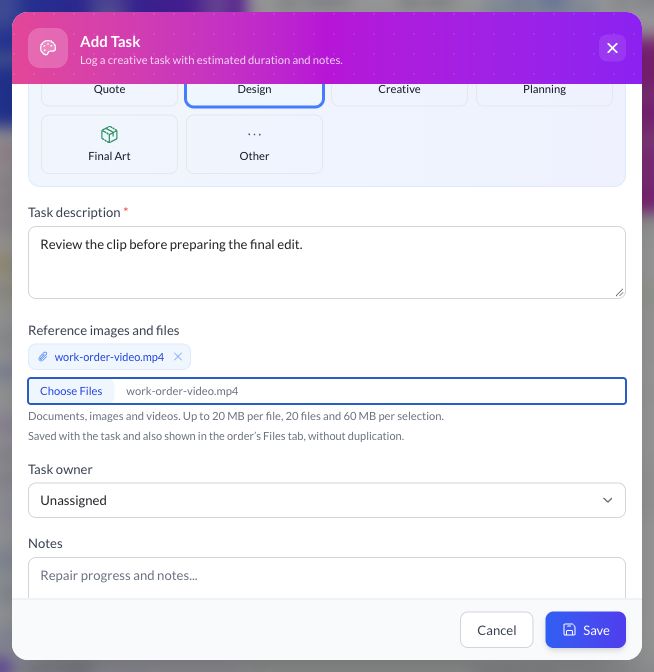
- On a work order, open Files → Upload file. On a task, open Add Task or Edit and select the video under Reference images and files.
- Select your file. Task attachments support MP4, MOV, M4V, WebM, AVI, MKV, WMV and 3GP, alongside the existing documents and images.
- Check the filename and wait for the upload to finish. On a new task, the attachment is saved when you click Save.
- The video stays on its task and also appears in the order’s Files tab as the same file, without duplication.
Maximum sizes
| Where you upload | Maximum per file | Selection |
|---|---|---|
| Work-order Files, desktop | 50 MB | One file per upload |
| Task attachments | 20 MB | Up to 20 files; 60 MB total |
| Work-order Files, mobile | 10 MB | Up to 10 files; 60 MB total |
On mobile, Photos and files lets you select photos, PDFs and videos. Camera still captures photographs. Case-file direct uploads retain the special limit shown in their upload window.
If a video exceeds the limit, compress it, export a lower-resolution version or split it into shorter clips. Renaming its extension does not reduce its size. An oversized selection shows an error before it is sent and can be corrected without losing the task details.
Organization storage
Video sizes count toward your organization’s attachment-storage capacity. Astra checks the whole batch before saving a task: if it exceeds capacity, it shows the warning and retains the form so you can adjust the selection. Check Settings → Preferences → Usage and allowances for current storage usage and limits.
View, download and share
The video icon identifies the file. In Files, use the preview button to play it. Your browser must support its format and codec; if it cannot play the video, use Download to open it on your device.
Task attachments are internal by default. Only files marked as customer-visible appear on the order’s public tracking page. Team access respects work-order file permissions, and uploads require permission to edit the order.
Need more help?
Our team is ready to assist you.