Export Electronic Invoice (FEE)
Export Electronic Invoice (FEE, code 09) supports sales of goods, services or intangible assets from Costa Rica to abroad. This guide explains when to review it and how to issue it in Astra.
When does FEE apply?
| Transaction | What to review |
|---|---|
| Your business sells goods exported outside Costa Rica. | FEE, buyer details, tariff code and export evidence. |
| Your business supplies services or intangible assets from Costa Rica to abroad. | Confirm whether this is an export. Customer domicile alone does not establish where a service is supplied or used. |
| A foreign person buys and receives goods within Costa Rica. | This is a local sale; review FE or Electronic Ticket according to the receiver and transaction. |
| Your business buys from a foreign supplier. | This is a purchase. See the FEC guide and applicable supporting documents. |
Do not select FEE just because the customer is foreign, pays in dollars or has an overseas address. Confirm the transaction. Correct contact details if they are wrong.
Before issuing
- Configure your organization’s electronic invoicing and verify its certificate and credentials.
- Review the buyer’s name, actual identification, email and overseas address. Do not invent identification or add zeros to change its type.
- Prepare items, quantities, prices, currency and CABYS. For goods, confirm the correct 12-digit tariff code; it is different from CABYS.
- Retain the contract or order, delivery evidence and customs documents where applicable. Review uncertain service classification with your accountant.
How to issue FEE in Astra
- Create and save the sales invoice with the customer and items.
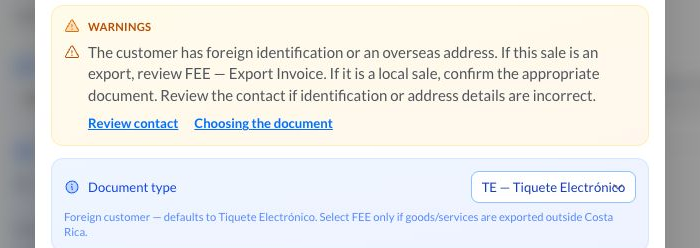
- Open the Electronic Invoice review. Astra warns when the contact has foreign identification or an overseas address. Use Review contact before continuing if needed.
- For a contact configured as foreign, choose FEE — Export Invoice under Document type. If unavailable, review the contact identification; an overseas address does not automatically change its type.
- Complete the buyer’s overseas address, between 5 and 300 characters. For each goods line, complete the 12-digit tariff code.
- Review dates, currency, total, issuer activity, commercial details and emails. Resolve validation errors.
- When the transaction and document are correct, press Send to Hacienda and check the response.
Taxes and supporting evidence
When FEE is selected, Astra prepares the export document with zero taxes and removes exonerations from the submission. Tax amounts saved on the original invoice are not automatically changed. Review differences between the submitted document and invoice amounts before sending or using them in reports.
Hacienda acceptance of the XML alone does not establish that the transaction qualifies as an export or replace supporting evidence. Retain the invoice, XML, Hacienda response and transaction evidence; confirm tax treatment with your accountant when needed.
Response and corrections
If processing, check status before attempting another submission. If rejected, review the reason and follow the rejected invoice replacement guide. For an accepted document, review credit notes or debit notes as appropriate.
Common problems
| Situation | What to do |
|---|---|
| FEE is unavailable. | Check that this is an unissued sales invoice and the contact is correctly configured as foreign. Do not change real details to force the option. |
| Missing overseas address. | Enter the buyer’s actual address in submission review. |
| Missing or invalid tariff code. | Confirm the 12 digits for every goods line. Astra does not require that field for services. |
| Local identification with an overseas address. | Review both details and the transaction. Correct errors; the address alone does not determine the document. |
Sources and review
Reviewed October 12, 2026. FEE definition and use follow article 2 of the electronic-document regulation. Steps and validation describe Astra’s current behavior.