Remember IVA conditions on purchases
Updated 11 October 2026. Screenshots use a fictional company.
Save a confirmed decision so Astra can fill repeated purchases from the same supplier without asking AI again. Expense category and IVA condition are different fields.
Confirm the first purchase
- Open Accounting → Tax Review → Purchases and expand the document. Or press Classify with Astra on the purchase's path: it opens the Classify purchase window over that document, with its own question Remember for this supplier's next purchases? beside Confirm (Remember, Don't remember or Ask each time; see The Classify purchase window).
- Review its category and choose the Condition for each line carrying IVA. Exempt lines do not need a credit condition.
- Keep Remember confirmed IVA conditions selected if the choice should be reused.
- Select scope: Same supplier and item for the same description, or Same supplier and CABYS only when that code has consistent business use with this supplier.
- Choose Save Adjustments. Saving the confirmed choice teaches the rule; an unconfirmed AI suggestion does not.
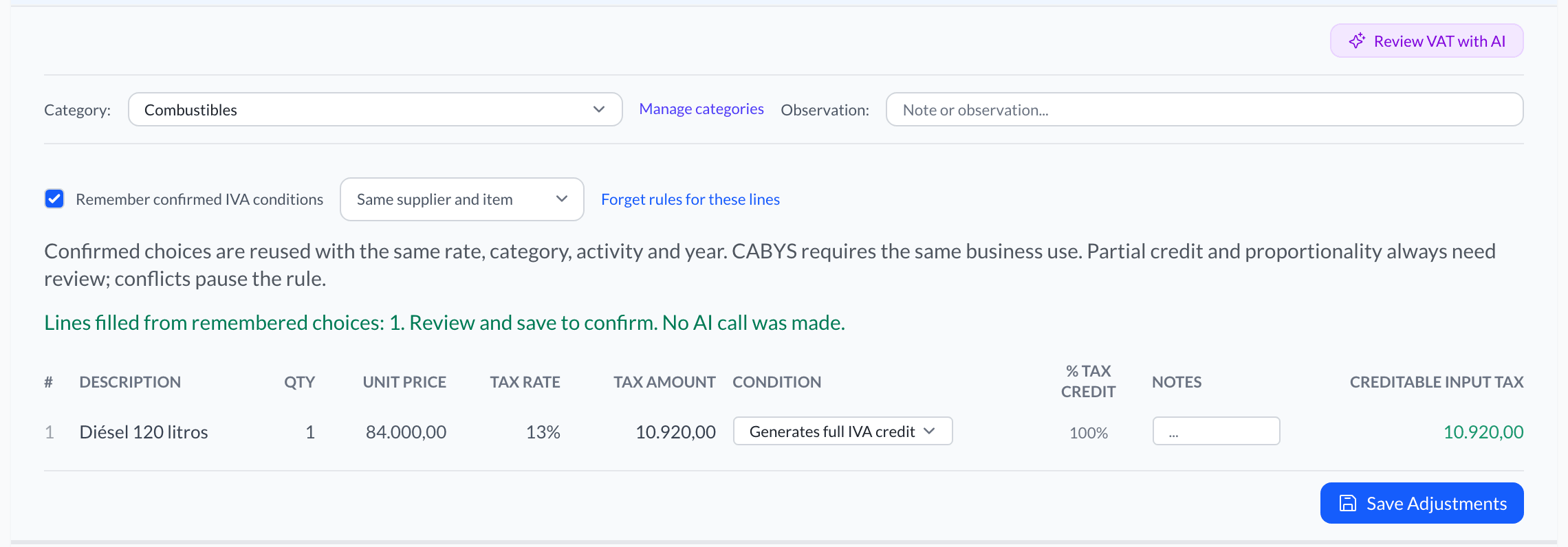
The supplier's next purchases
A purchase from the same supplier whose VAT lines all have a rule is reviewed on its own, as remembered. If a line has no rule, the purchase waits for a person and the window comes with the lines that do have one already set.
When you confirm with Remember, the supplier's other purchases waiting in the same month are decided at once and leave the list, even when that month's return is already past due: you are reviewing that month. Those of other months are decided in the background. In a month whose VAT return is already past due, that only happens when every line is 01 (full credit), because the credit then stays as it was declared; the rest wait for a person.
Matches require the same organization, supplier, rate, category, economic activity and year. Item scope also compares normalized descriptions; CABYS scope requires a valid code. Rules are never shared between companies.
When another review is needed
- Partial credit and proportionality: never remembered because percentages and circumstances need checking. Custom percentages are also excluded. These decisions pause a matching older rule.
- Conflicting decisions: different conditions on different documents pause a rule.
- Different context: changed information or activity prevents a previous rule from applying.
- Existing manual condition: opening the form does not replace it with a rule.
- VAT profile: a rule with a condition your company's VAT profile no longer offers (01 for a company that only sells exempt, for example) doesn't apply: the purchase waits for a person.
Correct or stop remembering
Clear Remember confirmed IVA conditions to save only this document. Forget rules for these lines removes rules for this context and allows a new confirmed choice; it does not change earlier documents. Review the condition again before saving.
Business use still matters. Memory reuses a human decision; it does not certify that every purchase with that CABYS receives the same fiscal treatment.