Approve financial changes proposed by AI
Updated 20 October 2026. Screenshots use a fictional company.
When the assistant proposes a change that touches money, accounting, taxes, payroll or incoming stock, you approve it in Astra. When you tap Approve, Astra records the change right away: there is no need to go back to the chat. Approval does not move money at the bank.
What you approve in Astra and what in the chat
You approve in Astra: collections and payments, invoices and their lines, purchases and their lines, receiving a purchase order, banks and reconciliation, journal entries, month or year closes, IVA and tax filings, payroll, employees, assets and consignments.
Drafts and day-to-day records are confirmed in the chat, without going to Astra: estimates and their lines, purchase orders (lines, dates, mark as sent, confirm or cancel), work orders, contacts, appointments, products and product suppliers, locations, cost centers, pausing or cancelling a recurring schedule, and credit or debit note drafts. Converting a purchase order into a purchase, voiding its receipt, or creating, editing or resuming a recurring schedule is approved in Astra.
Review a proposal
- Ask the assistant for the action: for example, recording a collection, loading the lines of a supplier invoice or closing a month. When there are several (every line of a purchase), ask it to prepare them all before you open the link.
- Open the link the assistant gives you. It goes to Approve assistant changes with that proposal highlighted. The same proposals also appear in Settings → AI assistants.
- Proposals on the same document are shown together, under the document number and the supplier or customer (a link that opens it). Each one says what it does in one line: for example, “Add 300 × Corrugated box · CRC 420,00 each · IVA 13 %”. For the others, check amounts, accounts, dates and scope.
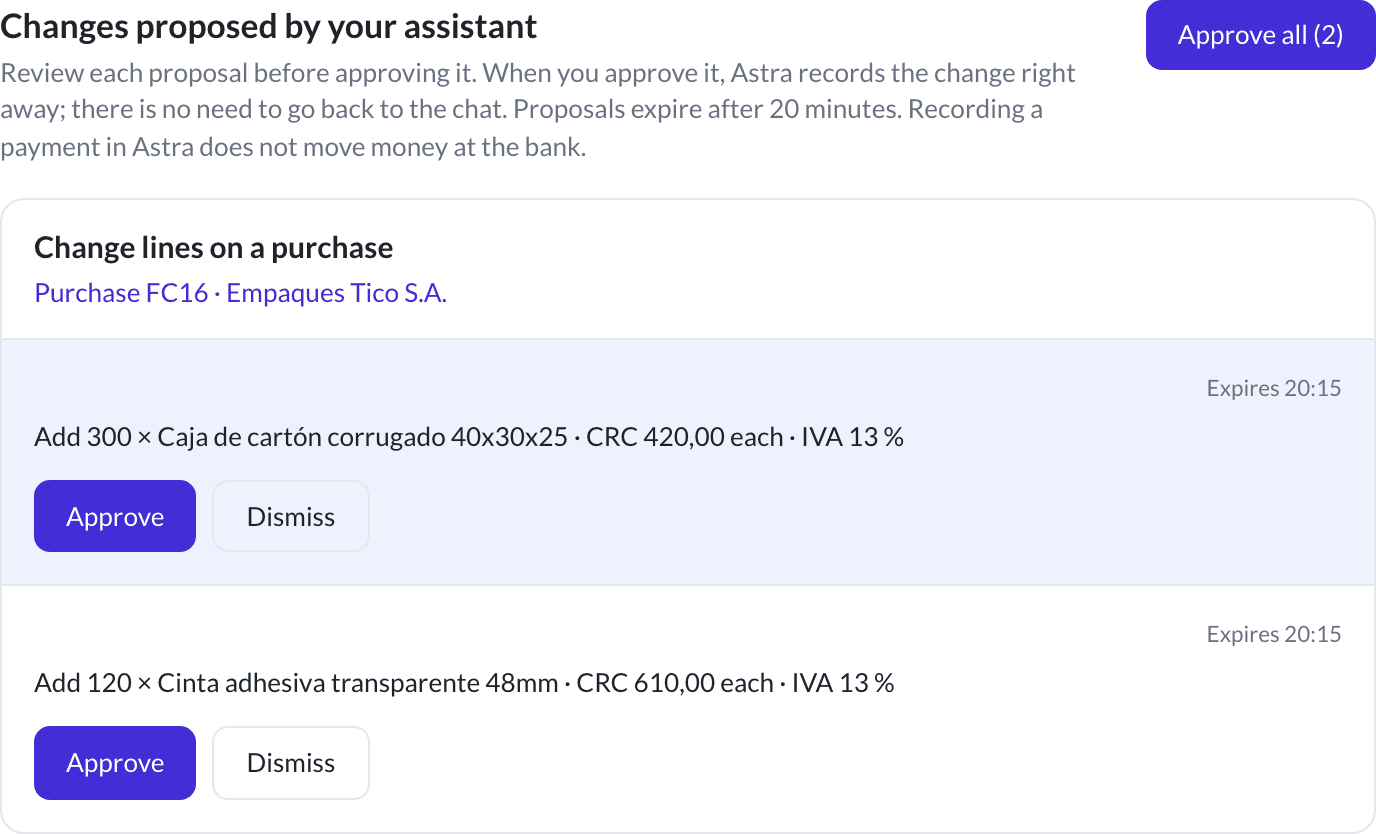
Approve or dismiss
Tap Approve only when the details are correct: Astra records that change at that moment and the assistant can read the result. Approve all records every pending proposal, one by one, in the order they were made. Dismiss cancels it; request a new proposal when details need changing.
If a change cannot be recorded (for example, the month is already closed), the proposal shows Not recorded with the reason, and the assistant receives the same message.
If it expires or data changes
A proposal expires 20 minutes after it was made. If something else changed in the company meanwhile (a sale, a new contact), Astra works the proposal out again with today’s data: if it comes out exactly as you see it, it goes ahead; if any detail changed (a price, a balance, the document’s status), it is refused and you ask the assistant for a new one. Saying “confirmed” to the assistant does not replace your approval in Astra.
If the assistant retries
A retry using the same approval returns the stored result without duplicating it. A new proposal authorizes another action: check whether the earlier action was already recorded before approving a new one.
The control covers integrated financial tools. It does not turn every IVA classifier suggestion into financial approval or replace permissions. For IVA, review lines and save adjustments in Purchases.
If you cannot find the proposal
Check that you use the same organization and user that requested it. Read-only accounts cannot approve changes. See also Connect and configure assistants.