Record tax submission and payment
Updated 6 October 2026. Screenshots use a fictional company.
My accounting tracks references for procedures completed outside Astra. Preparing, submitting, acceptance and payment are independent states.
Record evidence
- Open Accounting → My accounting and select the period.
- In Filing evidence, select IVA, 270 or income tax.
- Choose the state you can actually support: Prepared, Submitted, Accepted per receipt or Payment recorded per receipt.
- Enter a reference and notes. Submitted, Accepted and Paid require a reference; Prepared does not.
- Choose Save evidence. Recording one state preserves the references for the others.
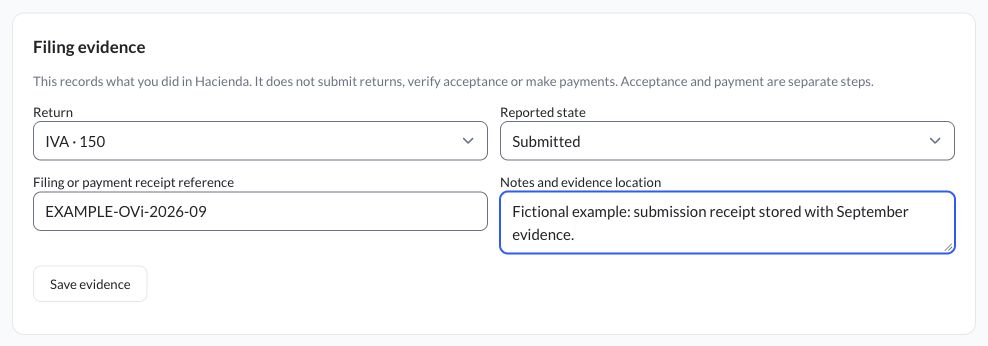
What each state means
- Prepared: preparation is finished; this does not mean submission.
- Submitted: you delivered it to Hacienda and retained its reference.
- Accepted: you verified acceptance and have supporting evidence.
- Paid: you recorded a payment actually made. Selecting this state does not send money.
Annual and monthly periods
Income tax is recorded by year. Return 270 for 2025 is also annual. Every month of 2026 is a separate 270 return even though all twelve share the 25/01/2027 deadline. Consult the fiscal Guide for updated dates.
Astra does not submit, query acceptance or pay in Hacienda. Do not mark Accepted or Paid simply because books closed. Saving requires accounting export permission and an account with editing available.
Read saved records
The list shows recent records for the selected year and their retained evidence. Check the period on each row; do not assume every row belongs to the selected month. Review calculations again before correcting a return after source changes.