Review and close a month
Updated 9 October 2026. Screenshots use a fictional company.
My accounting brings together monthly closing checks when you choose to keep books in Astra. Closing books does not submit returns or make payments.
Choose the period
- Open Accounting → My accounting.
- Select year and month. Check the period selector when opening another report: screens can retain different periods.
- Read the checks and choose Refresh review after resolving pending work.
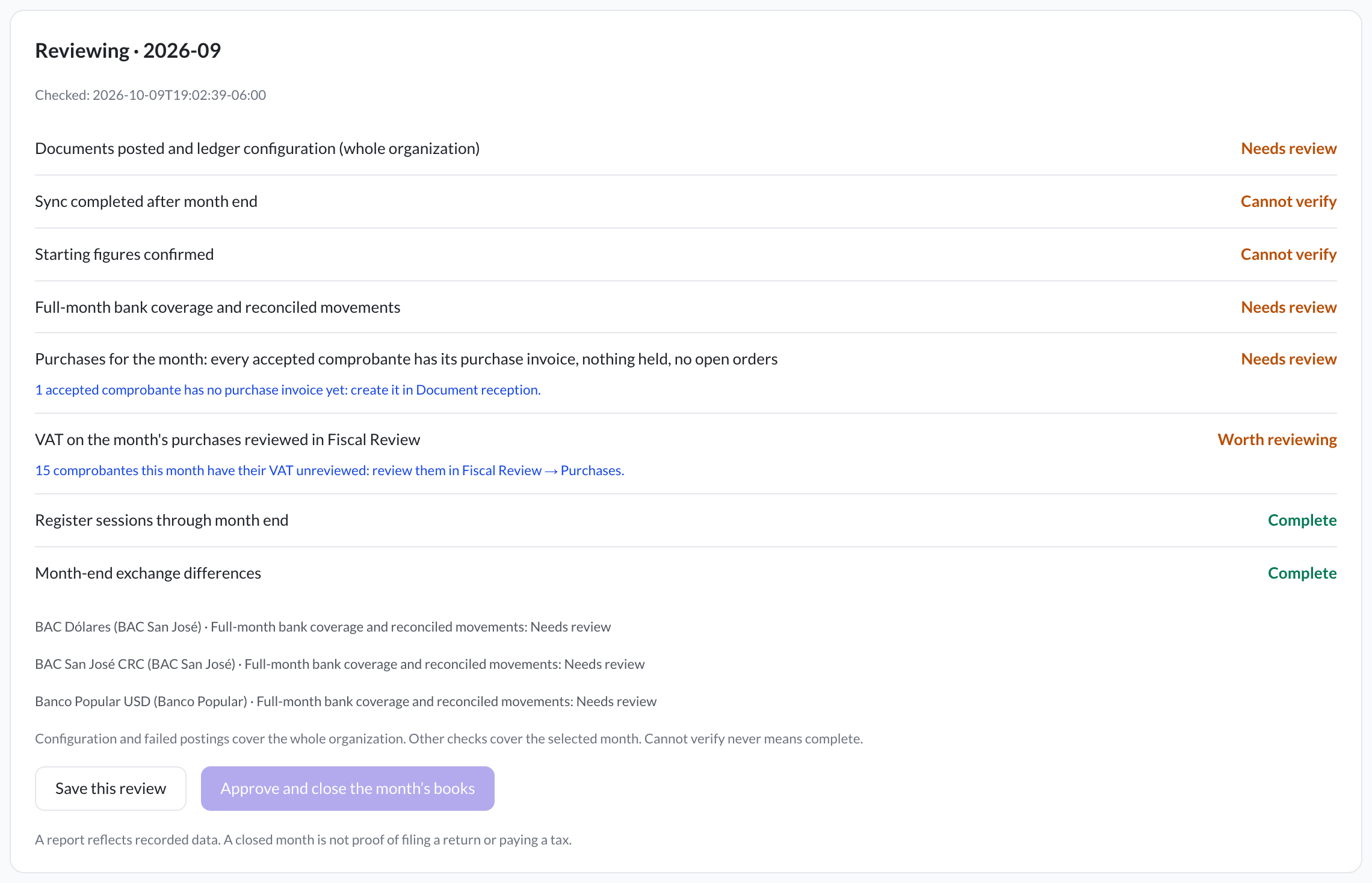
Understand each state
- Complete: the available check passed.
- Needs review: a known issue remains, such as unreviewed purchases, unmatched bank lines or documents missing from the books.
- Cannot verify: evidence, confirmed opening figures, access or synchronization covering the period is missing.
- Worth reviewing: worth a look, but it doesn't stop the close. Today only the VAT-on-purchases check uses it.
- Not applicable: the check does not apply to the business setup. A cash-only business does not need statements for bank accounts it does not have.
The month's purchases and their VAT
Two checks look at the month's purchases, and they don't weigh the same:
- Purchases for the month: every accepted comprobante has its purchase invoice, nothing held, no open orders — required. It counts the accepted documents that still have no purchase invoice, in every company, with or without automatic purchases: the supplier will charge and the books don't know. The link N accepted comprobantes have no purchase invoice yet: create them in Document reception takes you to create them (see Create the purchase invoice). It also counts held documents, purchases to review and orders received without an invoice.
- VAT on the month's purchases reviewed in Fiscal Review — recommended. If there are documents with their VAT unreviewed, it says Worth reviewing and how many, with the link to Tax Review → Purchases. The month can still be approved and closed: an unreviewed document keeps the VAT condition declared when it was accepted.
Resolve issues
Review opening figures under Ledger → Opening balances, purchases and documents in their lists, and bank statements under Banking → Reconciliation. The books panel shows posting failures and reasons. Correct the cause before retrying synchronization. Its manual action covers a recent window; an older period may need help synchronizing the complete month.
In the books panel, additional roles for production, year-end bonuses or foreign purchases appear in an expandable section. Unused roles are not an error. With permission to manage books, Configure suggested accounts adds missing assignments and preserves existing ones. Occupied codes or incompatible custom charts need review with your accountant.
Confirming opening figures in My accounting is your attestation that you checked them; it does not automatically reconcile balances. Keep supporting evidence and compare figures first.
Save review and close
- With permission to manage books, choose Save this review to retain the check.
- When every applicable check is complete, Approve and close the month’s books becomes available. Worth reviewing doesn't block it.
- Confirm the close. If sources changed since review, refresh before trying again.
The closed month protects books under closing rules. For taxes, continue with Record submission, acceptance and payment. Complete data checks do not certify every tax assumption.