What to do when Hacienda rejects an electronic invoice
Distinguish a pre-submission notice, a delay and an actual rejection before correcting or repeating an invoice.
A notice does not always mean Hacienda rejected your invoice. First identify where the process stopped. This lets you correct the right detail without duplicating a sale or resending a document already queued.
1. Read the status, not just the notice color
Open the document and read the full message. Pre-validation prevents incorrect data from being sent. Pending or processing means the result is still outstanding. Rejected means a rejection response arrived. Hacienda’s official API distinguishes receipt, processing and outcome.
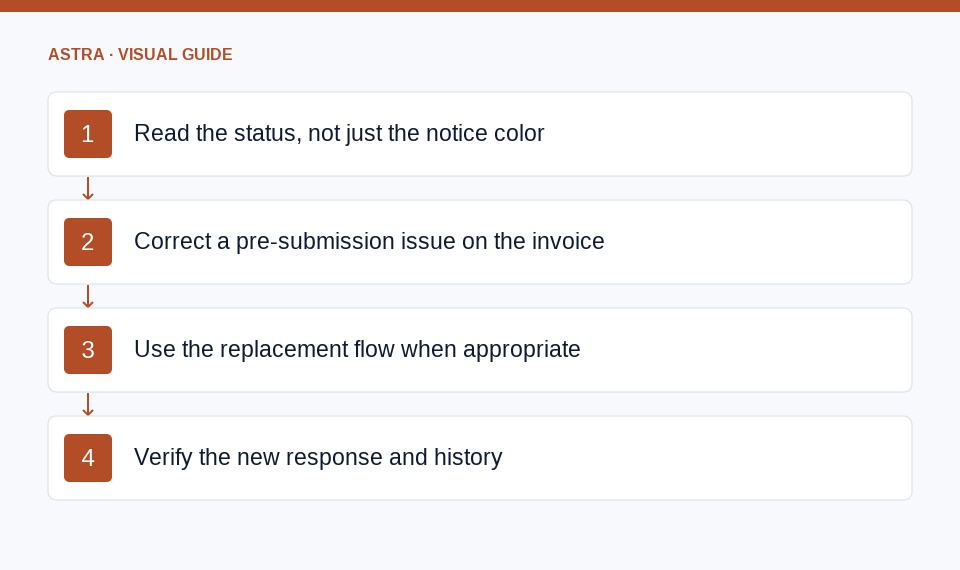
2. Correct a pre-submission issue on the invoice
If Astra stopped submission because of identification, CABYS, tax or another detail, use the notice to find the field. Check the customer information or catalog and correct it there. You do not need another sale to resolve a notice occurring before electronic issuance.
3. Use the replacement flow when appropriate
For an actual rejection, Astra offers Replace rejected invoice when the cause can be corrected. It creates an editable copy and preserves the link to the original. Correct the cause before submission. If it identifies a system error and blocks replacement, report it to Astra rather than trying several copies.
4. Verify the new response and history
Check that the corrected invoice obtained the expected result and preserve its history. If the original had payments, check their association with the replacement. A delay is not a rejection; if status remains unchanged unusually long, contact support with the key and message without publishing customer details.
A mistake to avoid
Do not use a credit note for every rejection. First distinguish accepted from rejected documents and follow the indicated flow.
Before your next step
- Customer and identification have been reviewed.
- Lines, taxes and totals match the transaction.
- I checked the outcome and kept supporting evidence.
Where Astra fits
Astra brings customer details, line items and document tracking together so you can continue working without copying the same information again. Check tool availability in the plan you choose.
Explore this Astra tool →Frequently asked questions
Does received mean accepted?
No. Receipt confirms that Hacienda received the request; the validation outcome is checked afterward.
General guidance for individuals and businesses in Costa Rica. Requirements vary by activity, municipality and institution. Confirm your case with the relevant institution and your accountant or notary.