Electronic invoice PDF and XML: what to check and deliver
Identify the document files and avoid confusing the PDF with Hacienda’s response.
Your customer or accountant requests the XML after receiving the PDF. They are not asking for another invoice: these are different files for the same transaction. Learn to recognize them so you can deliver available documents and check the electronic outcome.
1. Recognize the PDF
The PDF provides a readable representation: customer, lines and totals. It helps a person review the document but does not by itself establish Hacienda’s response. Do not edit the PDF outside the system to correct an issued invoice.
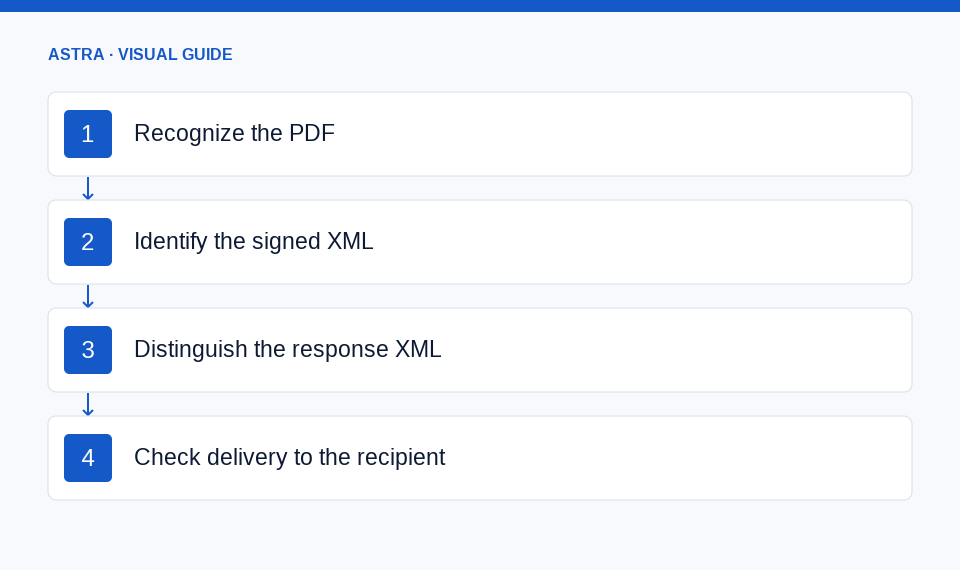
2. Identify the signed XML
The document XML contains the structured information transmitted electronically. Hacienda’s API receives signed XML. Keep that file associated with the invoice; do not substitute a screenshot or a similarly named file.
3. Distinguish the response XML
The response is a separate file communicating Hacienda’s outcome. If it is not yet available, it cannot be attached as though it had arrived. In Astra, review the document’s status and associated files to see what currently exists.
4. Check delivery to the recipient
Check the email and available files. Astra can send the PDF and signed XML first, then deliver the response in a follow-up when it arrives. For a resend, use the same document and verify the recipient; do not generate another invoice simply to resend files.
A mistake to avoid
An invoice can be paid while its electronic response remains pending. Check both statuses separately.
Before your next step
- Customer and identification have been reviewed.
- Lines, taxes and totals match the transaction.
- I checked the outcome and kept supporting evidence.
Where Astra fits
Astra brings customer details, line items and document tracking together so you can continue working without copying the same information again. Check tool availability in the plan you choose.
Explore this Astra tool →Frequently asked questions
Are the invoice XML and response XML the same file?
No. One contains the issued document; the other communicates Hacienda’s response.
General guidance for individuals and businesses in Costa Rica. Requirements vary by activity, municipality and institution. Confirm your case with the relevant institution and your accountant or notary.