How to correct errors before submitting an invoice to Hacienda
Check identification, CABYS, taxes and totals, with help correcting details inside the invoice.
If you invoice on your own, an error costs more than time: it interrupts work and customer delivery. Astra includes pre-submission checks and actions to correct detected problems inside the invoice. You do not need to wait for rejection to discover a missing detail that validation can detect.
1. Prepare the document and open submission
Select the customer and add the lines. When preparing submission, Astra checks the details the document needs: identification, header, items, CABYS and terms, according to document type. These checks go beyond verifying that a field contains text; they also assess consistency between details.
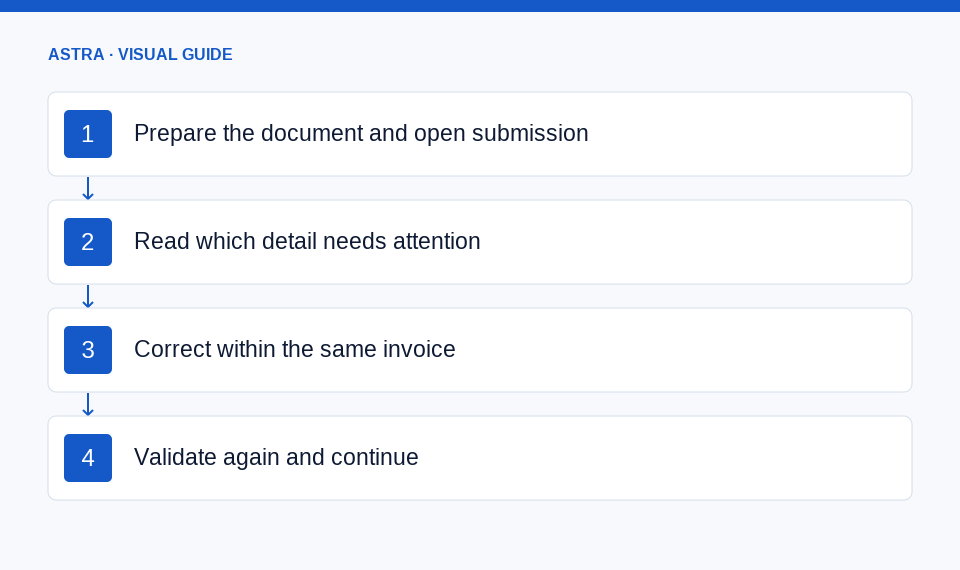
2. Read which detail needs attention
Validation identifies problems and, where an action is available, shows how to address them. Examples include recipient identification, missing CABYS, inconsistent tax rates or exoneración details. References and adjustment limits are also checked where applicable. Read the specific notice rather than guessing and changing several fields.
3. Correct within the same invoice
Use the action beside the notice to edit the detail or open the relevant line. Keep the sale in context: customer, items and total remain on the document. Before confirming a suggestion, check that it fits what you sold; technical help does not decide special tax treatment for you.
4. Validate again and continue
After saving, attempt submission again. Astra checks again; if another problem appears, address it before continuing. The electronic engine also checks line and summary calculations before transmission. When checks allow progress, it prepares and signs the XML for Hacienda. Then check the response and customer delivery.
A mistake to avoid
Pre-validation reduces detectable errors but does not guarantee acceptance: Hacienda performs its own validation.
Before your next step
- Customer and identification have been reviewed.
- Lines, taxes and totals match the transaction.
- I checked the outcome and kept supporting evidence.
Where Astra fits
Astra brings customer details, line items and document tracking together so you can continue working without copying the same information again. Check tool availability in the plan you choose.
Explore this Astra tool →Frequently asked questions
Must I leave the invoice to correct every notice?
Astra offers correction actions within the invoice flow for problems with an available fix. For issues requiring support or outside information, the message provides guidance.
General guidance for individuals and businesses in Costa Rica. Requirements vary by activity, municipality and institution. Confirm your case with the relevant institution and your accountant or notary.