Classify purchases, expenses and IVA with AI in Astra
Understand purchases, expenses and IVA credits in Astra. Review AI suggestions and remember supplier decisions to reduce repeated classification work.
You know why you bought each item: stock to sell, materials for your work or a service that keeps the business running. That information should help you understand your numbers and remain within reach. Astra’s new classification tools bring categories, ledger accounts and IVA review into a workflow the owner or business administrator can follow.
Your numbers should work for you too
This improvement grew from the experience of Astra’s creator: before using the system, accounting information was handled separately and it was difficult to see what those numbers said about the business. Now the owner can classify purchases inside Astra and see where spending goes and how IVA has been reviewed.
The aim is to give the owner a practical role. You contribute something no invoice fully explains: how the purchase was used. Your accountant can review the accounts and tax treatment using those same records. Classification then helps with day-to-day management as well as the month-end close.
- Identify what you bought
- Review category and account
- Confirm IVA treatment
- Remember repeat decisions
A suggestion provides guidance. A confirmed decision is what Astra can remember.
Category, ledger account and IVA: three separate questions
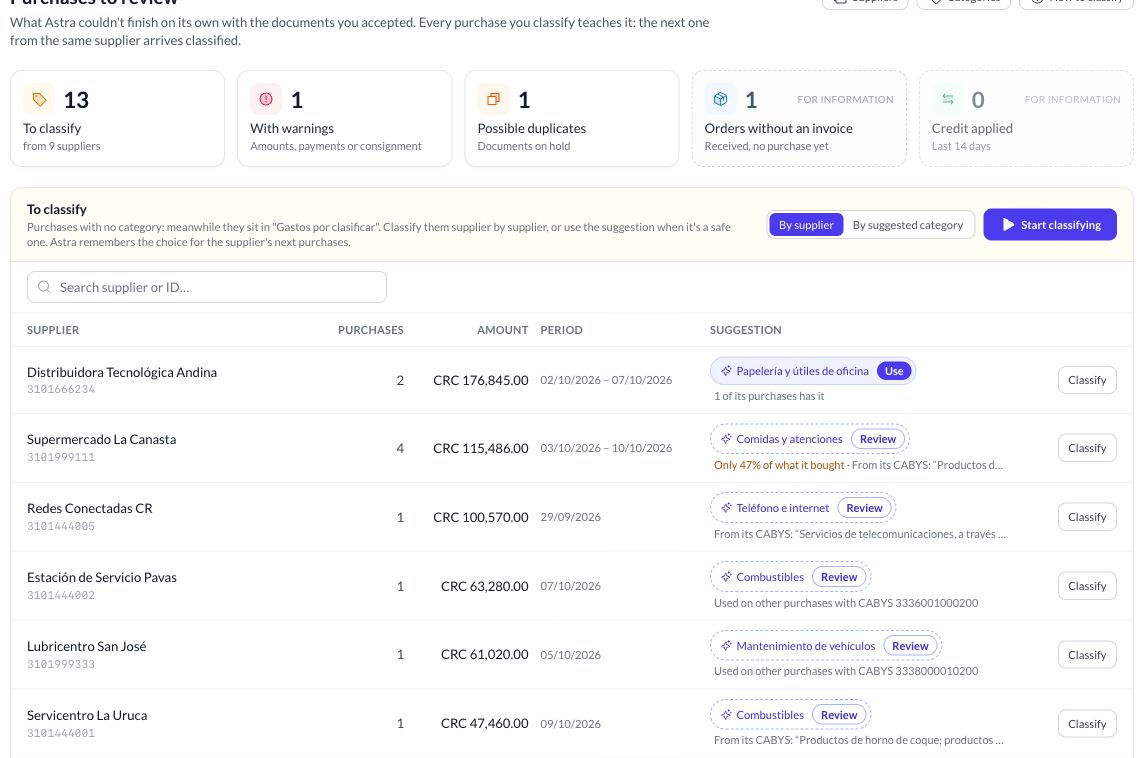
The category answers “What was this money spent on?” It might be rent, fuel, software or supplies. It also distinguishes inventory for resale, a fixed asset used over several years and a personal purchase that does not belong to the business. Buying something does not mean its entire cost is an expense for that month.
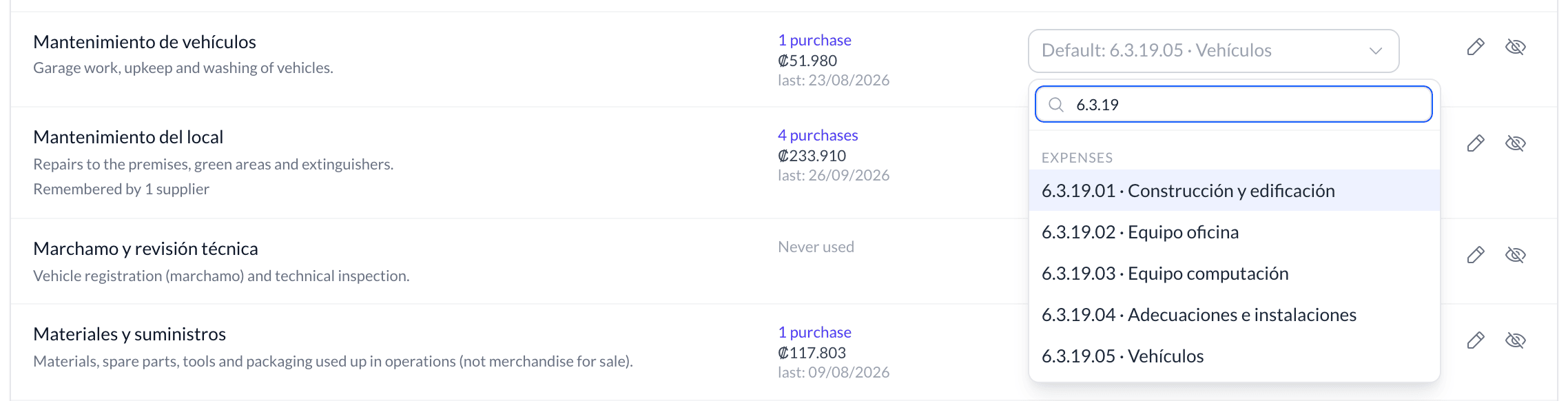
The ledger account determines where it is recorded in the books. Purchase categories in Astra offer default accounts and let you choose the account appropriate for your company. With the books configured and automatic purchases enabled, the category routes the purchase to its account. Without automatic purchases, categories still organize reports, but purchases post to the Purchases account.
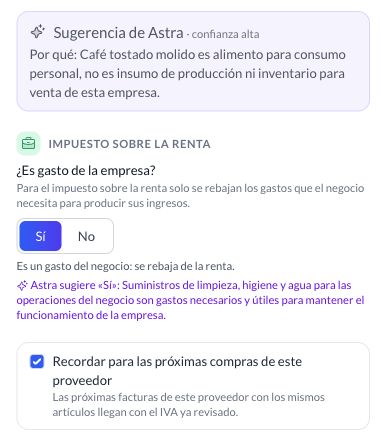
IVA treatment answers a different question: how much tax paid can be used as a tax credit. This also differs from deciding whether an expense is deductible for income tax. Selecting a category alone does not establish credit entitlement or automatically make a purchase deductible.
Let AI guide you and read its explanation
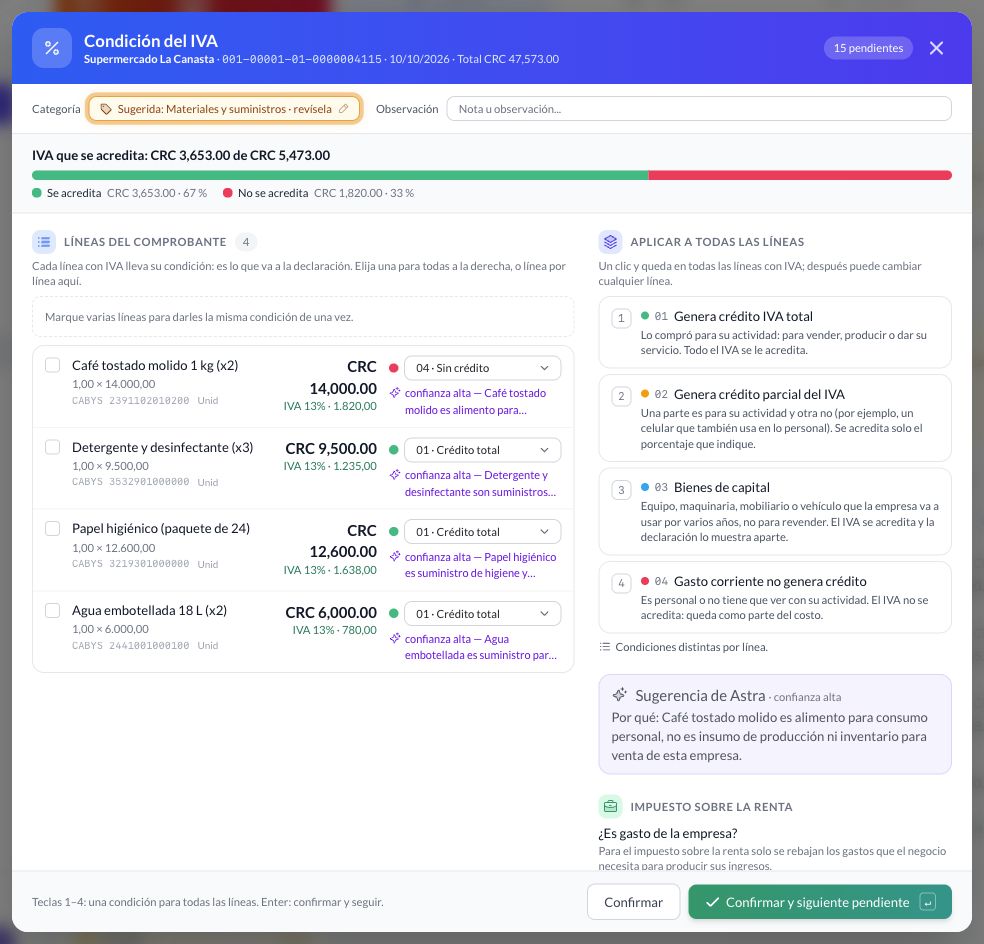
During IVA review, Astra can analyze invoice lines alongside the company’s economic activities. AI suggests a category and IVA treatment for each line, displays its confidence and explains its reasoning. It can also help assess whether a purchase belongs to the business for income-tax review. When recording an expense, the accounting concept picker offers assistance to suggest a concept, CABYS code and rate when enough information is available.
Not every category suggestion comes from AI: Astra also uses previous decisions, supplier history, CABYS codes and item descriptions. The interface identifies the source of the suggestion. Memory avoids another AI request when a matching confirmed decision already exists.
Read the explanation and confirm the actual use. A computer bought for resale serves a different purpose from one bought for the office. An invoice containing different items may need different IVA treatments by line. When context is missing, your business knowledge and your accountant’s review are part of the decision.
Remember repeat purchases from a supplier
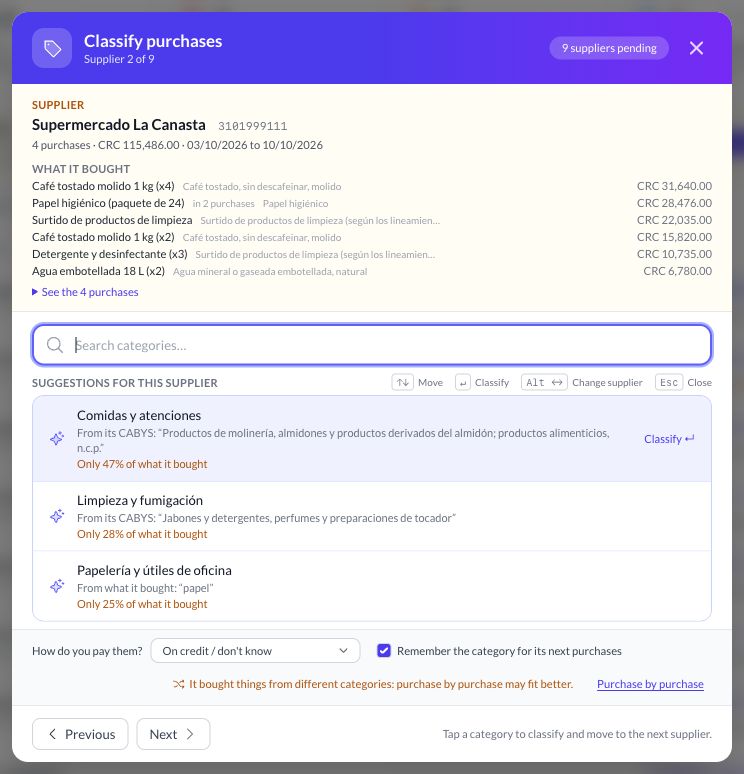
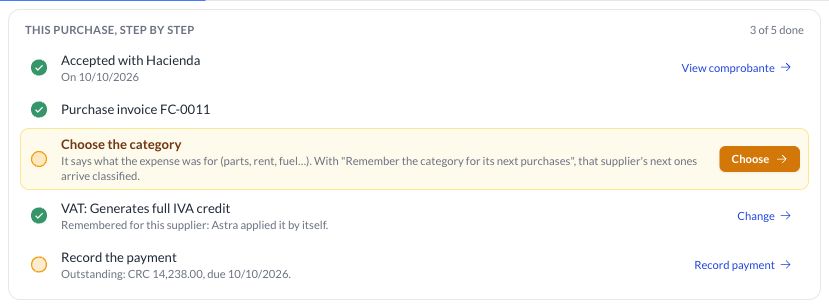
If a supplier consistently sells you something for the same purpose, choose the category and keep “Remember the category for their next purchases” selected. Astra saves that preference for subsequent purchases from that supplier. The configured category-to-account mapping avoids choosing that ledger account again for each purchase.
IVA has its own remember option. Confirm line treatments and select “Remember for this supplier’s next purchases” in the IVA window. Fiscal Review also lets you choose the scope: the same supplier and item, or the same supplier and CABYS when business use is consistent. An AI suggestion alone does not teach a rule: you must confirm the decision.
When every taxed line matches valid rules, an accepted document can have its IVA reviewed automatically. If a line does not match, it waits for review. Astra preserves the decision’s context; partial credits and special percentages require review, conflicts pause the rule, and closed months are not changed.
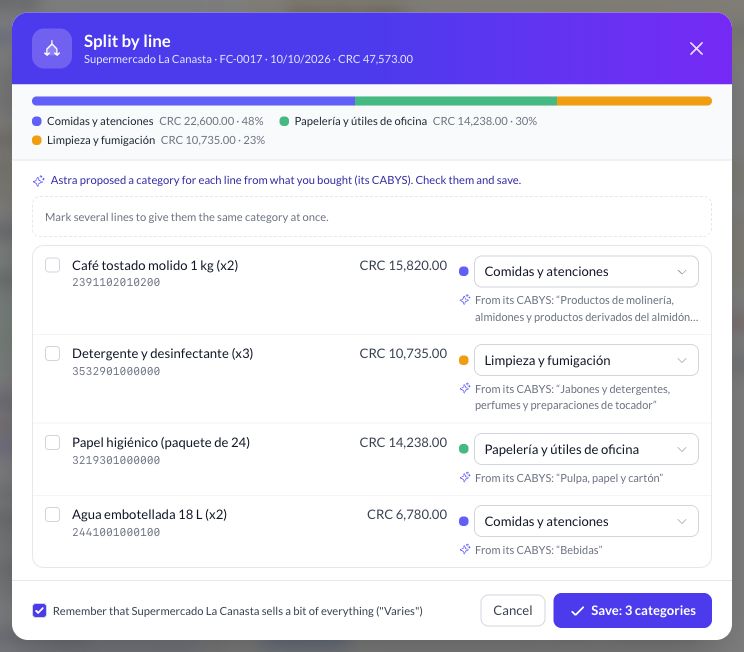
For a supermarket or hardware store where you buy different things, use “Varies: classify each purchase.” You can also split a purchase by line. Remembering helps with what actually repeats; exceptions keep their own review.
Make it a short administrative routine
Start with your regular suppliers. Review a few purchases, confirm the right categories and remember consistent decisions. With automatic purchases, Expenses → Purchases to review brings pending items together and lets you work supplier by supplier or by suggested category. You can also classify from the purchase invoice itself.
Then handle exceptions: a new item, a mixed invoice, a personal purchase or a treatment requiring a percentage. In the IVA window, “Confirm and next pending” helps you continue reviewing. The aim is to reduce repeated work, not hide decisions that still need information.
See what your purchases say about the business
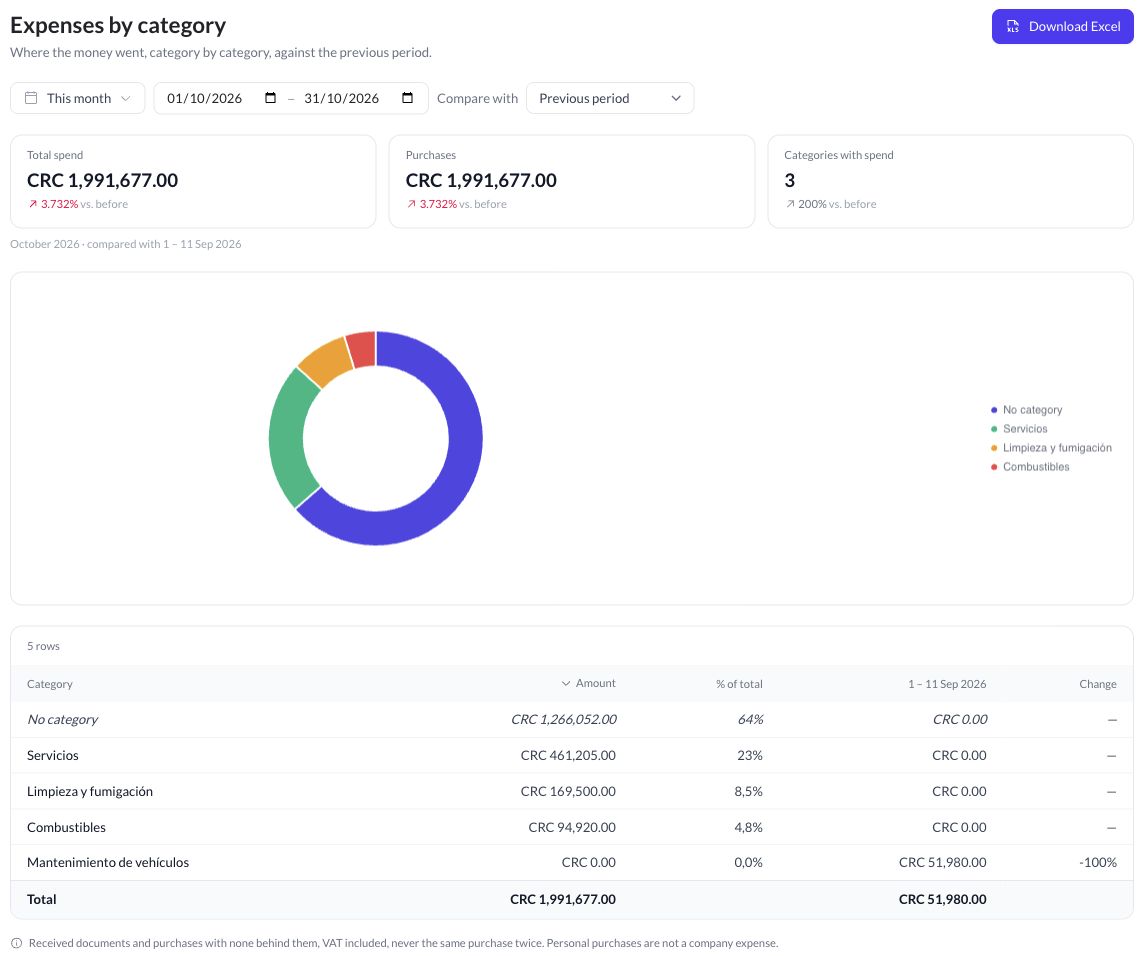
With categories up to date, open Expenses by category in Reports and the expense distribution in Home or Business Summary. Identify the largest spending categories, compare periods and find items still uncategorized. For IVA, Fiscal Review → Purchases and Tax Summary let you review credits and pending documents according to your plan.
That is the difference we want: an owner who can open Astra and understand the records while managing the business. Share questions and adjustments with your accountant using the same information, rather than waiting for figures from a separate system. Reviewing numbers in Astra does not itself submit or pay a tax return.
Before your next step
- I distinguished expenses, inventory, assets and personal purchases.
- I reviewed the account mapped to the category and how my company records purchases.
- I read the AI reasoning and confirmed each line’s actual use.
- I remembered consistent decisions and left exceptions for review.
- I checked the reports and shared tax questions with my accountant.
Where Astra fits
Purchase and expense classification is available in the Accounting / ERP plans, starting with ERP Pyme. Fiscal review and AI assistance for IVA classification and accounting concept suggestions require Contabilidad Pro, included from ERP Pro; AI use is subject to plan availability and quota.
Start with a supplier you use frequently. Review a purchase, confirm what should be remembered and check how it appears in your reports. ERP plans include dedicated accountant access so you can invite your accountant to work from the same records.
Explore this Astra tool →Frequently asked questions
Does Astra remember everything with one checkbox?
No. Supplier categories and IVA treatments have separate options. Ledger accounts are configured by category. Reviewing all three decisions lets you reuse the right information without confusing them.
Must I classify every invoice from the same supplier again?
A remembered category is reused for subsequent purchases. IVA can be reviewed automatically when every line matches confirmed rules and the context remains valid. New items, conflicts, partial credit and other changes can require review.
Does IVA credit mean Hacienda refunds money to me?
Here, credit means purchase IVA that qualifies to be applied in the tax calculation. It is not a promise of a cash refund. The result depends on the transaction and tax requirements.
Does AI replace my accountant?
AI provides guidance and explanations; you confirm how a purchase was used, and your accountant can review the treatment, accounts and close. The purpose is for both of you to work with information the owner can also access and understand.
General guidance for individuals and businesses in Costa Rica. Requirements vary by activity, municipality and institution. Confirm your case with the relevant institution and your accountant or notary.