How to organize product and service delivery
Define scope, owners, quality and delivery dates. Learn to reduce waiting and track jobs in Astra with a process your team can understand and follow.
The customer buys an outcome. To deliver it consistently, your team needs to know what was promised, what information is missing and when the job can be considered complete. This guide proposes a simple process from request to verified delivery, using a service example and its application in Astra.
Define what successful completion means
Write the outcome from the customer’s perspective. For a product, it may mean the correct item and quantity delivered to the agreed address. For a service, include scope, final format, review and who accepts delivery. “Complete” needs evidence.
Fictional example: a studio designs a digital menu. Before starting, it confirms dimensions, text, authorized images, date and the customer’s designated approver. Delivery is complete when the agreed files pass review and the customer receives the final version. This prevents each team member from interpreting the request differently.
- Confirm request
- Prepare and design
- Review and approve
- Deliver and record
Adapt the steps to your work. Internal review and customer approval have different owners.
Prepare inputs before committing to a date
Check capacity and materials, staff availability and customer information. A date promised without these details can quickly become an emergency. Separate working time from waiting time to understand where work accumulates.
Use a quote to make clear what is included and what costs extra. Keep reference files and agreements with the job. If an input is missing, record what it is, who will request it and when they will review the case; do not leave an ownerless wait.
- Scope and approved proposal version.
- Required details, materials or files.
- Job owner and quality reviewer.
- Agreed date and conditions that may change it.
Make work visible in Astra
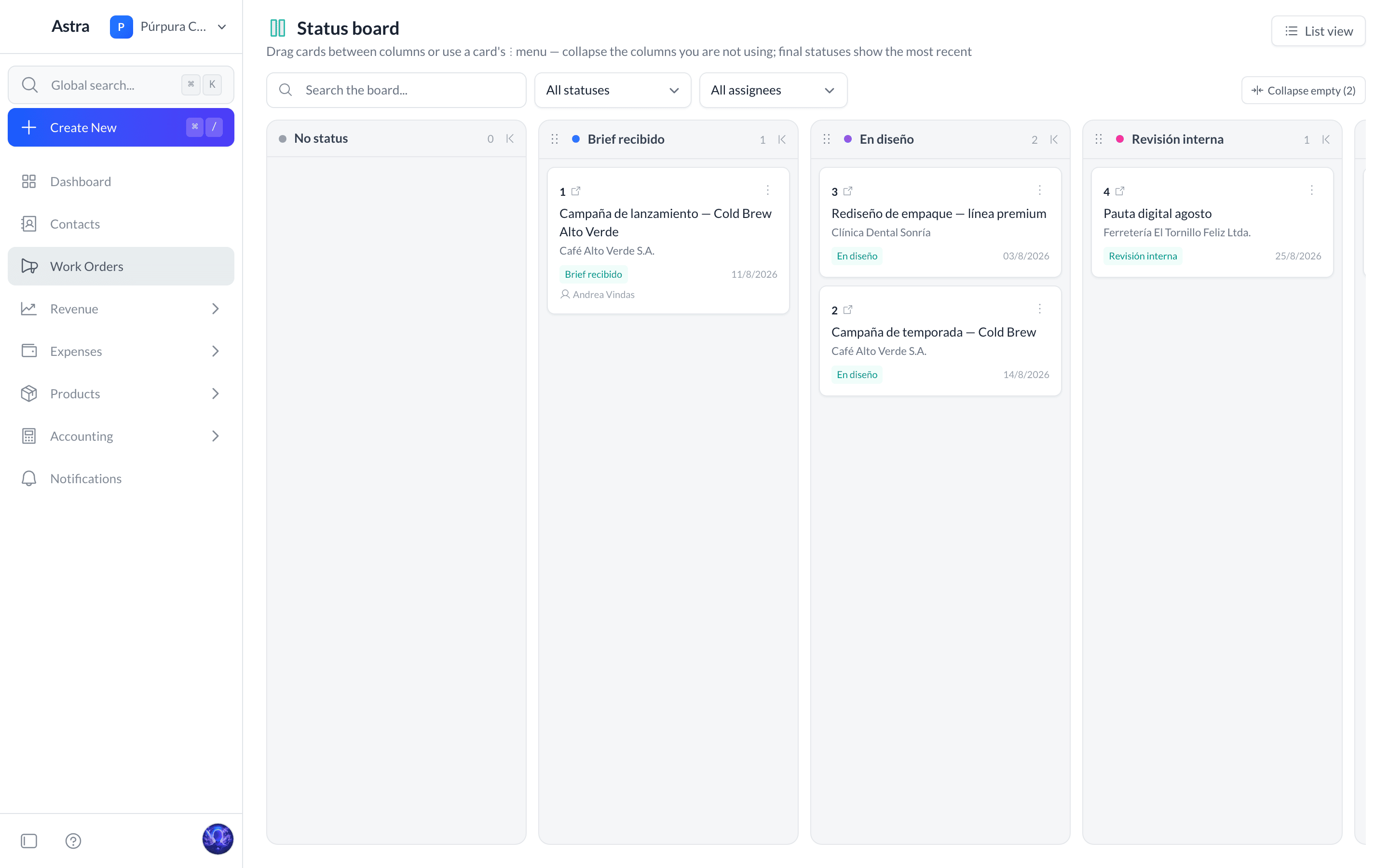
With the Work Orders add-on, record the job, assign it and follow its statuses. The board shows work by stage and supports filtering by assignee. Use the tasks, notes and files available for your organization’s order type, and link quotes where applicable.
The board makes progress visible; the team must update it when something happens. Agree on a routine: when inputs arrive, when review passes and when delivery occurs. The next person should find what they need without reconstructing an entire conversation.
Prepare a response to changes and delays
A useful process includes exceptions. If the customer changes scope, describe the change, estimate its effect and seek approval before continuing. If a new quote is required, preserve its relationship to the previous one. For delays, communicate a revised date and record the reason.
Define a specific quality check: correct text and dimensions for a design; item, quantity and packaging for a product. The person doing the work can check first, but agree when a second review is needed. Moving a card does not complete a stage when its check is missing.
The customer requested another format after the job was ready. What would you do?
Compare the request with the approved scope, record the difference and confirm price and timing if they change. Keep the new approval with the job so the team delivers the correct version.
Measure timeliness and rework, not just activity
Choose a few measures with stable definitions. On-time delivery: deliveries within the agreed date divided by deliveries with a due date. First-pass quality: jobs passing without corrections divided by jobs reviewed. Duration: time between a defined start and delivery; distinguish working days from calendar days.
Fictional example: eight of ten deliveries with a due date were on time, or 80%. That does not say whether they were profitable or whether customers were satisfied. Review the two delays and any corrections as well. Calculate these measures from records or exports; do not assume all are automatic Astra reports.
Try the process sheet on five similar jobs. Then ask the team which detail was missing and ask customers whether they received what was agreed. Change one instruction, test again and retain a dated version everyone can consult.
Before your next step
- I defined the outcome, quality and delivery evidence.
- I confirmed inputs before promising a date.
- We assigned owners and status-update responsibilities.
- We agreed how to approve changes and communicate delays.
- We chose measures we can calculate from the records.
Where Astra fits
Work Orders is an add-on available for Accounting / ERP plans. Your organization’s enabled industry defines its workflow; confirm with the Astra team that it suits your activity. The example screens show a design studio, not an identical workflow for every business.
Astra lets you retain owners, statuses, quotes and job records. Start by making a workflow you already understand visible, review exceptions and use the records to improve delivery.
Explore this Astra tool →Frequently asked questions
Should products and services use the same process?
They share scope, ownership and verification, but their checks differ. A product needs item and quantity checks; a service may need diagnosis, approval or final files.
Does the board replace team instructions?
No. The board shows status. Instructions explain what must happen before the next stage and who checks it.
General guidance for individuals and businesses in Costa Rica. Requirements vary by activity, municipality and institution. Confirm your case with the relevant institution and your accountant or notary.